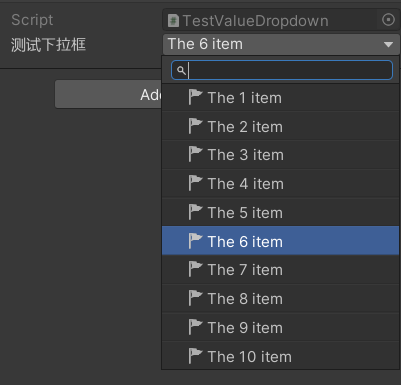
基于ValueDropdown拓展以支持自定义icon
之前遇到过一个需求是要在下拉框的目录做一个标记来指示状态,应该很自然就可以想到能不能修改一下 icon,比如把文件夹的那个icon改成其他颜色的,这样会比修改显示名字毫无疑问更加显眼。
不过其实想要进行更大限度的修改是完全可以的,只需要魔改一下 ValueDropdown 就行。
先说一下简单的解决先前提到的需求的办法吧——改显示名字。
一般是使用 ValueDropdownList<T> 或者 IEnumerable<ValueDropdownItem<T>> (二者是等价的) 作为函数的返回值,比如:
[ShowInInspector, LabelText("测试下拉框")]
[ValueDropdown(nameof(GetAllowIndexs))]
private int Index;

private ValueDropdownList<int> GetAllowIndexs()
{
    var list = new ValueDropdownList<int>();
    for (int i = 0; i < 10; i++)
    {
        list.Add($"The {i + 1} item", i);
    }
    return list;
}
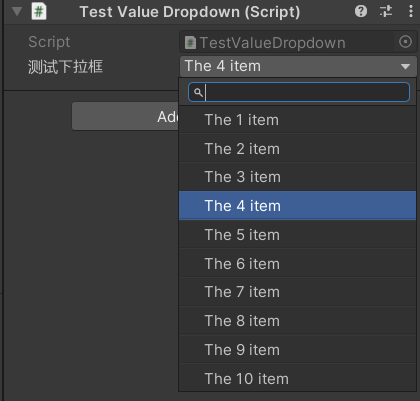
效果如下,可以给每个 value 都指定自定义的名字,不过更复杂的操作似乎就不行了(或者我没有找到?)
拓展 ValueDropdown
既然原本的 ValueDropdown 无法满足需求,那就自己搓一个吧,写一个类继承原来的 ValueDropdown 特性。
然后我们再原来的基础上,再添加一个回调字段
#if UNITY_EDITOR && ODIN_INSPECTOR

using System;
using System.Diagnostics;

namespace Sirenix.OdinInspector;

[AttributeUsage(AttributeTargets.All, AllowMultiple = false, Inherited = true)]
[Conditional("UNITY_EDITOR")]
public class CustomValueDropdownAttribute : ValueDropdownAttribute
{
    public string ItemAction;

    public CustomValueDropdownAttribute(string valueGetter, string itemAction)
        : base(valueGetter)
    {
        ItemAction = itemAction;
    }
}

#endif
然后自定义 attribute drawer
namespace Sirenix.OdinInspector.Editor.Drawers;

public sealed class CustomValueDropdownAttributeDrawer : OdinAttributeDrawer<CustomValueDropdownAttribute>
{
    // ...
}
简单看一下 ValueDropdownAttributeDrawer 的实现,就会发现是基于 OdinMenuTree 做的,每一项其实都是一个 OdinMenuItem,所以不妨让我们的自定义的回调的参数是 OdinMenuItem,这样就可以实现更大限度的自定义每一项。
添加一个 ActionResolver 字段原来解析传入的方法名
private ActionResolver? itemAction;
然后在初始化函数中添加解析逻辑,(也别忘了设置错误信息)
if (base.Attribute.ItemAction is not null)
{
    itemAction = ActionResolver.Get(
        base.Property,
        base.Attribute.ItemAction,
		new[] { new ActionResolvers.NamedValue("item", typeof(OdinMenuItem)) }
    );
}

error = rawGetter.ErrorMessage ?? itemAction?.ErrorMessage;
翻一下逻辑,会发现设置 icon 是通过 AddThumbnailIcons(preferAssetPreviewAsIcon: true); 调用。所以我们修改一下这部分的逻辑,当 itemAction 为空时,就继续走老逻辑,如果不为空,那就尝试调用解析的逻辑
else
{
    genericSelector.SelectionTree.EnumerateTree(x =>
    {
        itemAction?.Context.NamedValues.Set("item", x);
        itemAction?.DoAction();

        if (x.Icon == null)
        {
            x.AddThumbnailIcon(preferAssetPreviewAsIcon: true);
        }
    });
}
测试效果
在原来的测试代码那里添加一个函数
private void HandleItem(OdinMenuItem item)
{
    item.Icon = EditorIcons.Flag.Active;
}
并且修改字段的特性
[CustomValueDropdown(nameof(GetAllowIndexs), nameof(HandleItem))]